Fly VFR with a chart that's always under you.
PilotCharts overlays your live GPS position on real aeronautical charts from openAIP — cached to your device automatically, so it keeps working with no signal. Explore over 50,000 airfields with official AIP chart links, see active and deactivated airspace NOTAMs directly on your moving chart with TFR boundaries, track your planes fleet and live ADS-B traffic with real photos, plan routes with 2D terrain elevation cross-sections, and fly with a Glass PFD or analog steam gauges.
Free for moving map and airport info. All premium features free with account creation during beta.
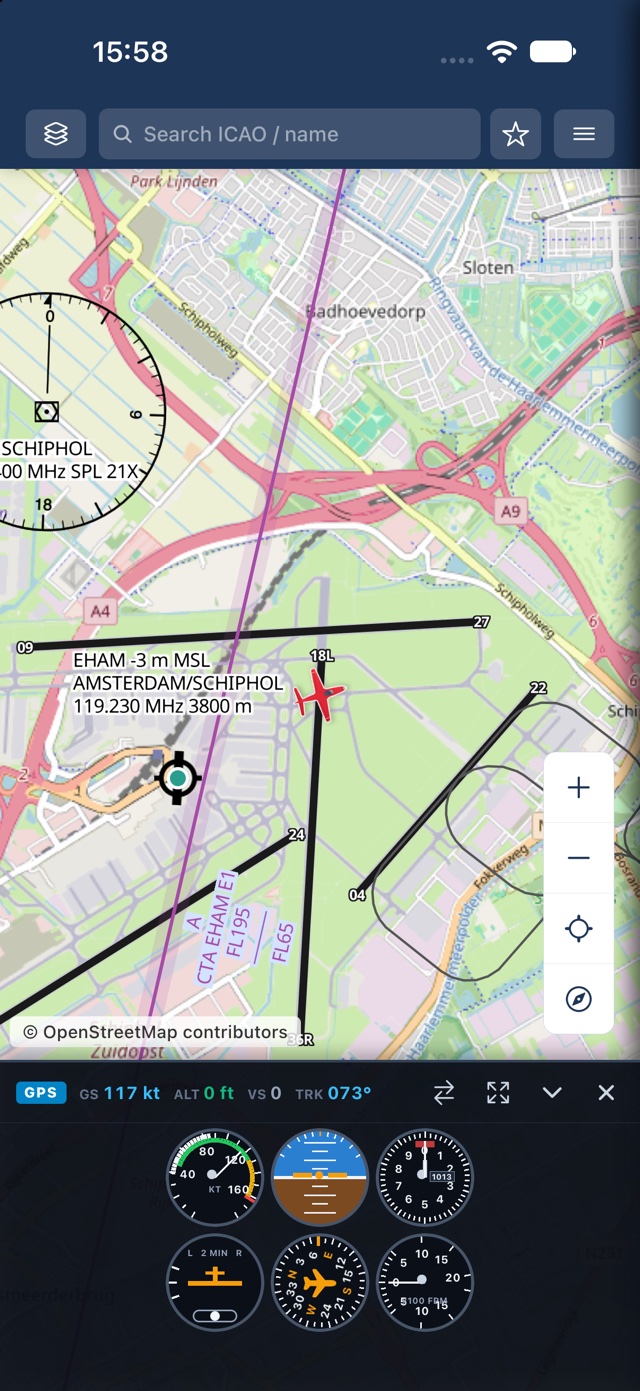
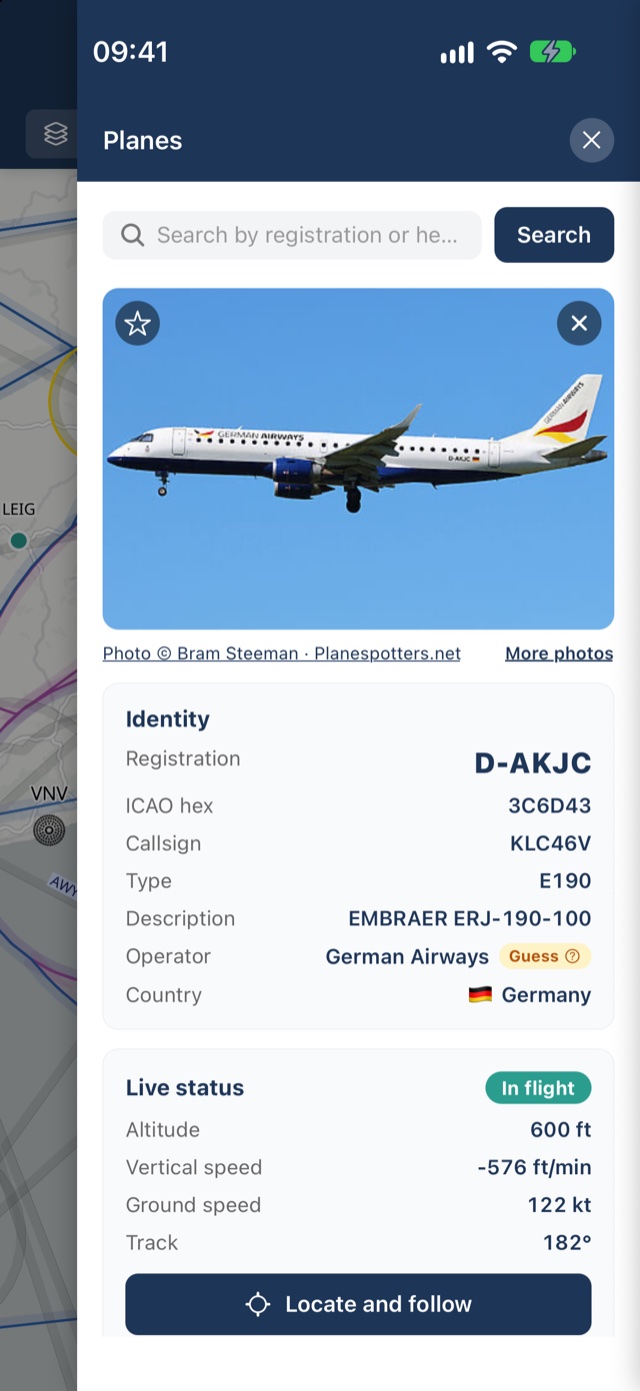
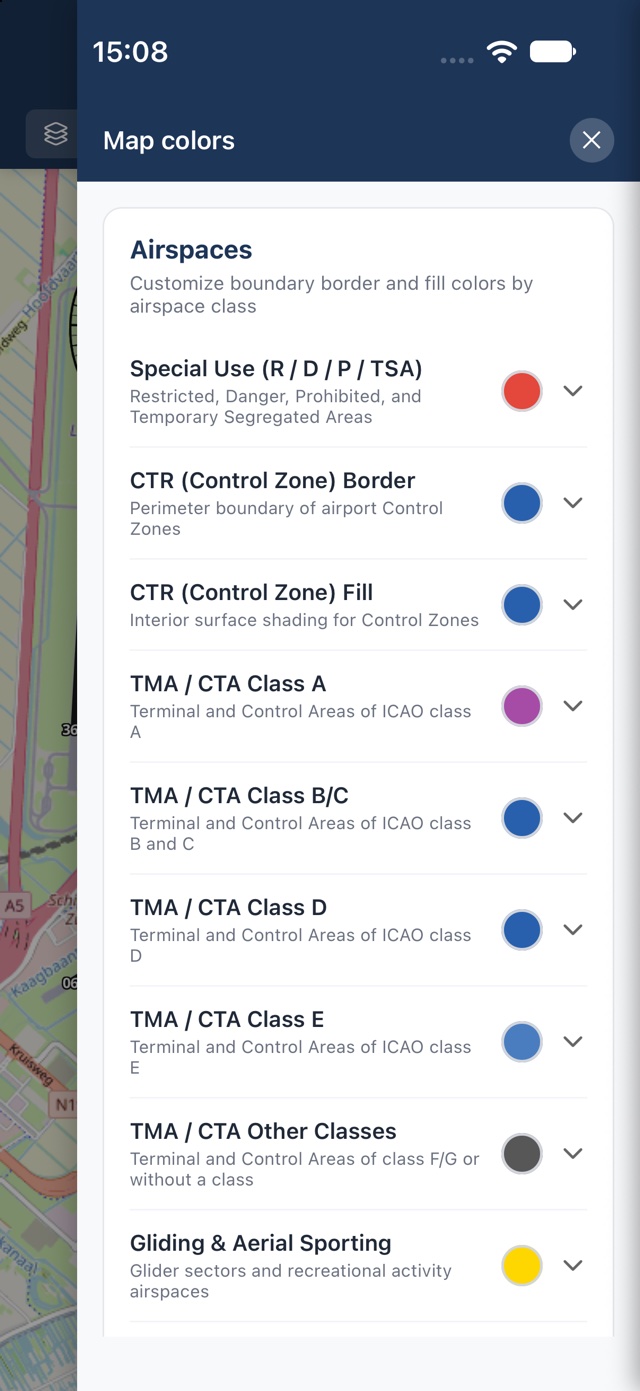
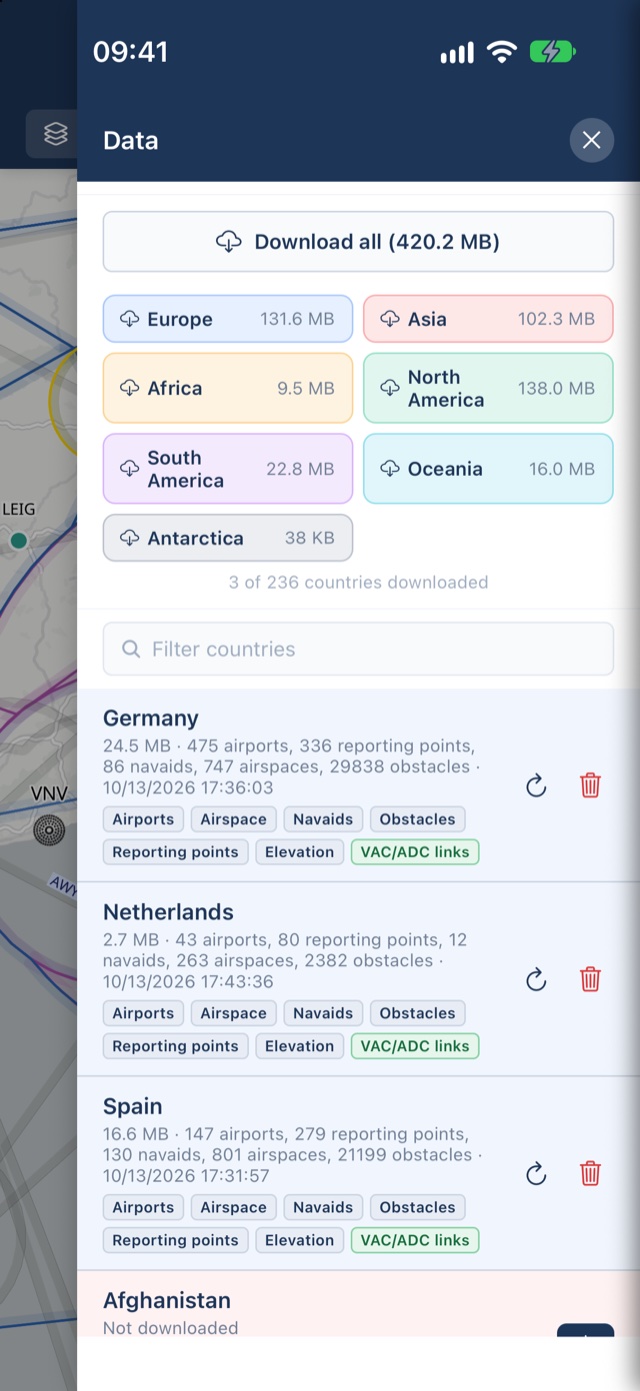

Available now on Apple TestFlight • Coming soon on Google Play
Everything you need to find your way
The core moving map is free for every pilot — no trial, no account, no catch.
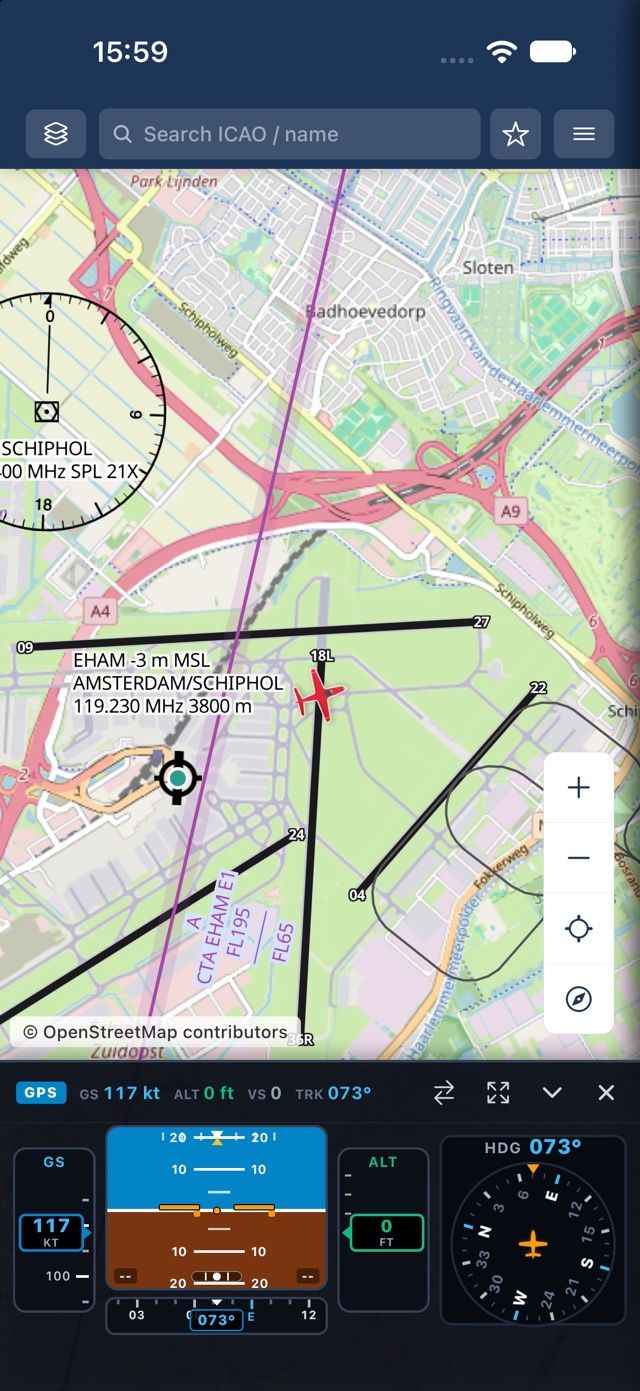
Live moving map
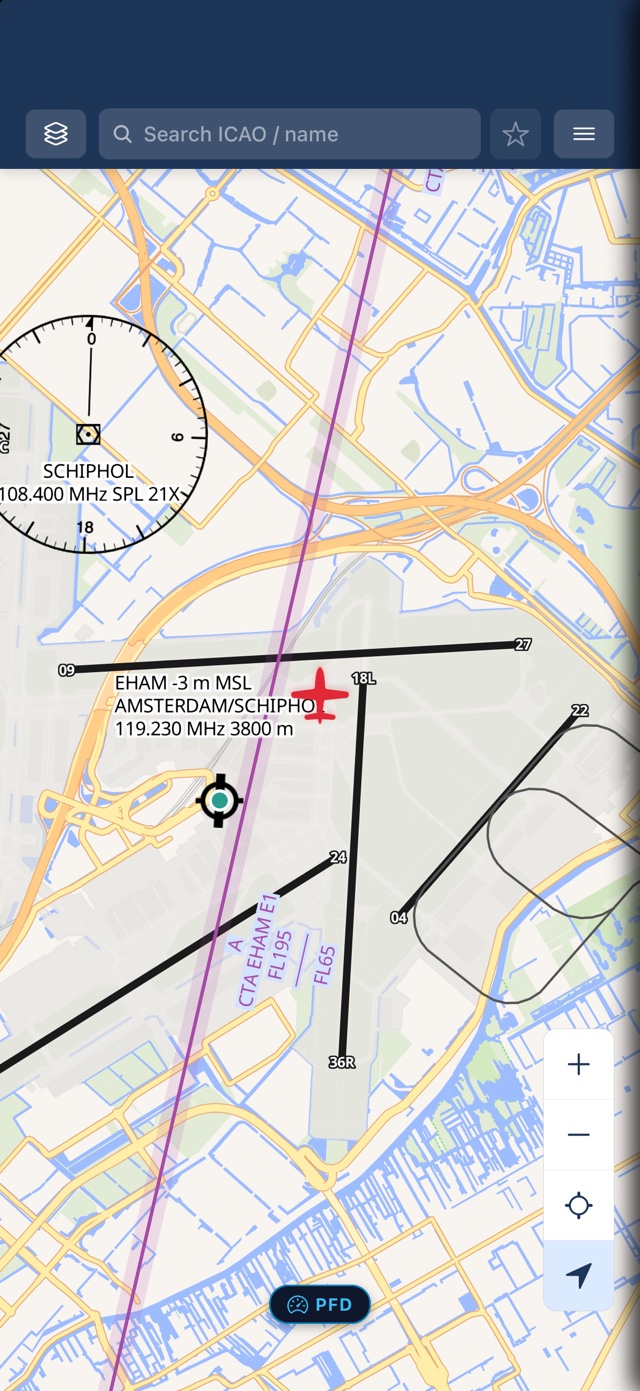
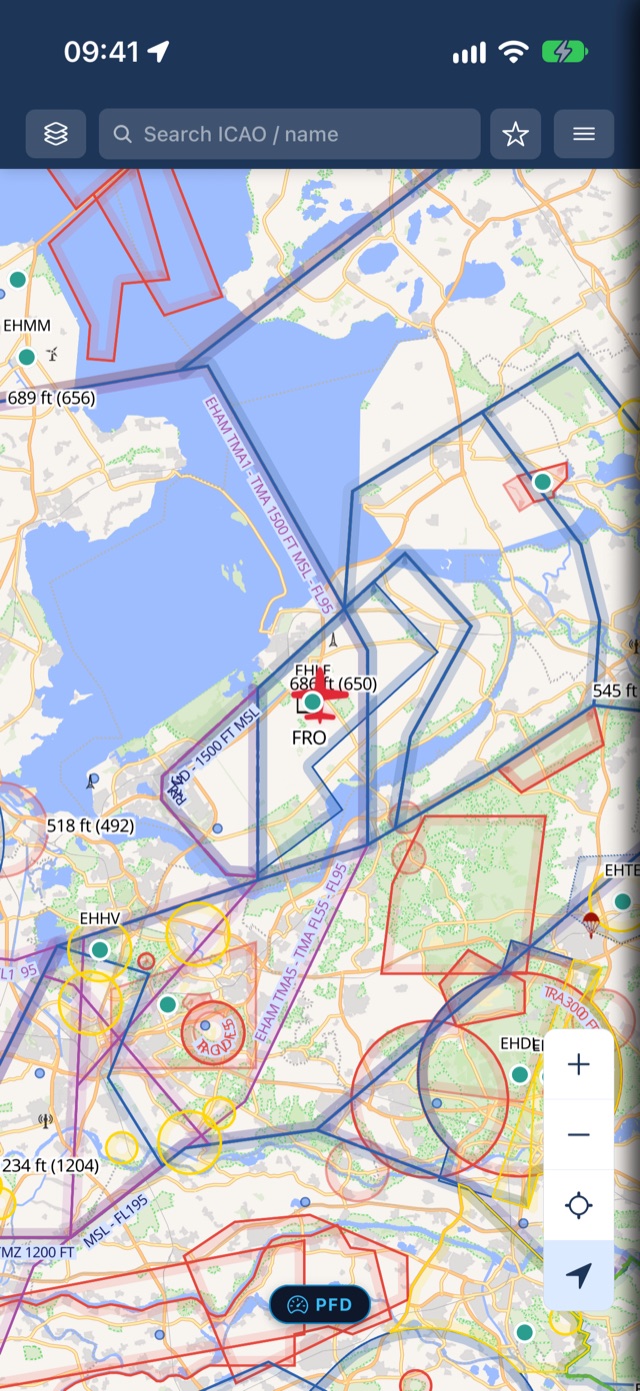
Your position, rendered as a rotating aircraft on top of a real VFR aeronautical chart — OpenStreetMap base plus openAIP's chart overlay.
Works with no signal
Map tiles cache to disk automatically as you fly. Pan over an area once online, and it keeps working offline — no manual downloads for the map itself.
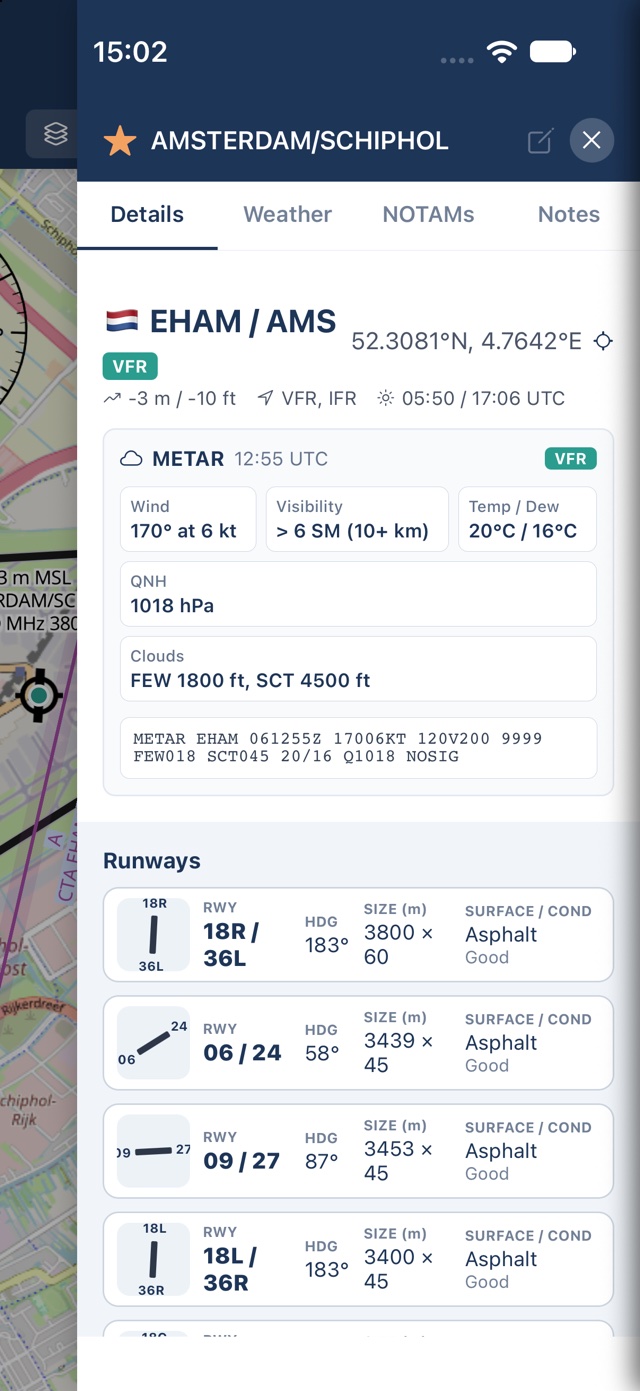
Airport details from openAIP
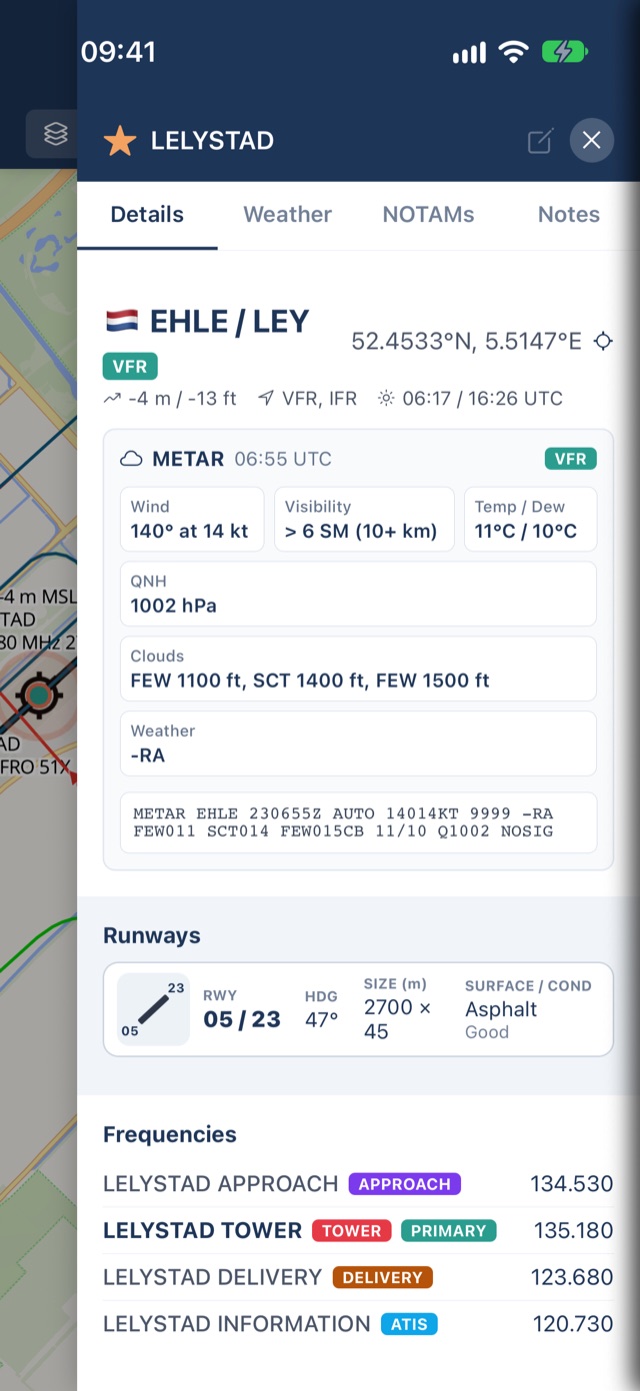
Elevation, runways, frequencies, PPR, contact info, and hours of operation — straight from openAIP, for airports worldwide.
50,000+ airfields & grass strips
Search international airports, regional hubs, unpaved backcountry grass strips, glider fields, and ultralight sites with national flag badges and code tags.
Official charts, one tap away
Jump straight to an aerodrome's official chart PDF from the national AIP, opened in your browser — never redistributed in-app.
Instant search & filter
Find any aerodrome by ICAO code, IATA code, or name with live search-as-you-type, plus live search across all app and map display settings.
Flight stopwatch
Floating cockpit stopwatch with pause/resume and lap reset for hold entries, procedure turns, and leg timing — with customizable corner placement.
Deep map personalization
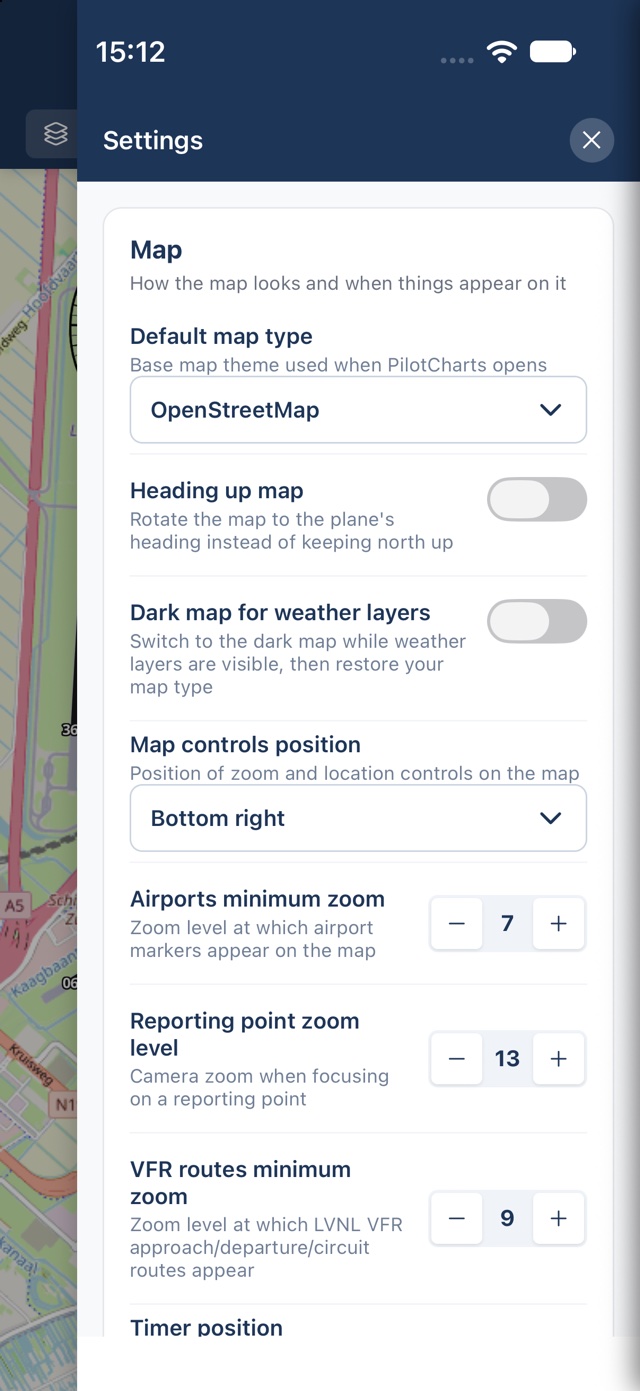
Choose North-Up or Heading-Up orientation, configure custom follow zoom levels, select multiple base map themes, and place floating map controls in any corner.
Download what you need
Pull airports, reporting points, navaids, airspace and obstacles for any country, worldwide — free, by country, forever.
See it in the cockpit
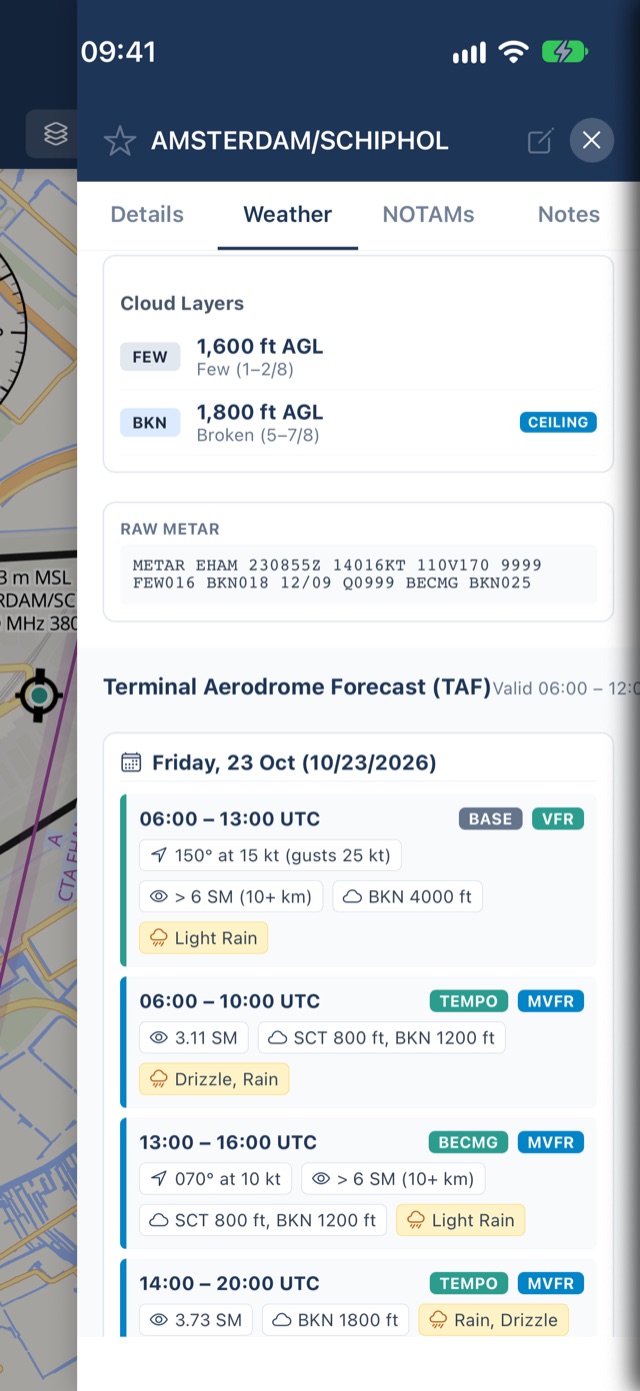
Real screens from PilotCharts on iPhone and iPad. Tap any screenshot to zoom in.
iPhone
iPad
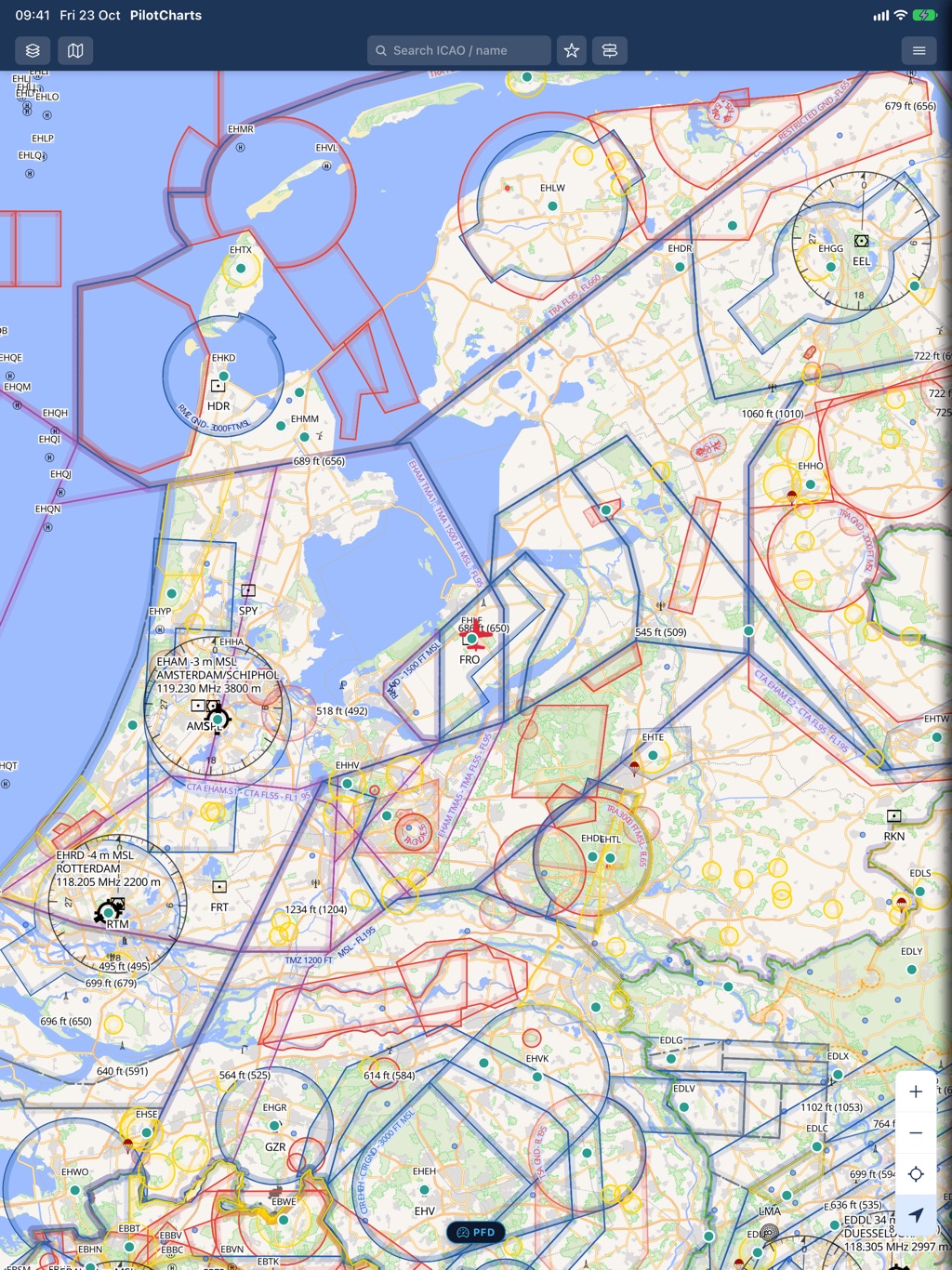
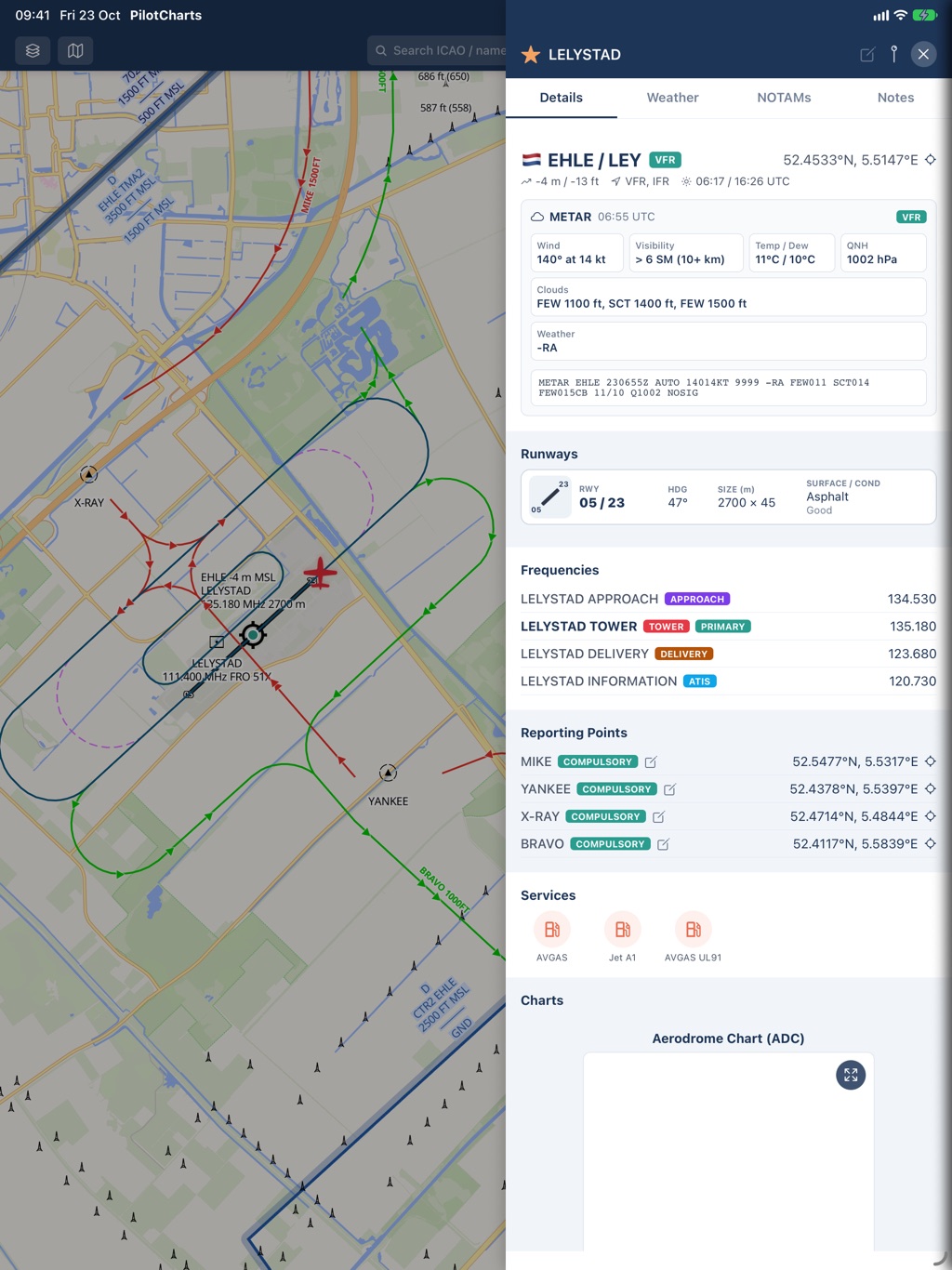
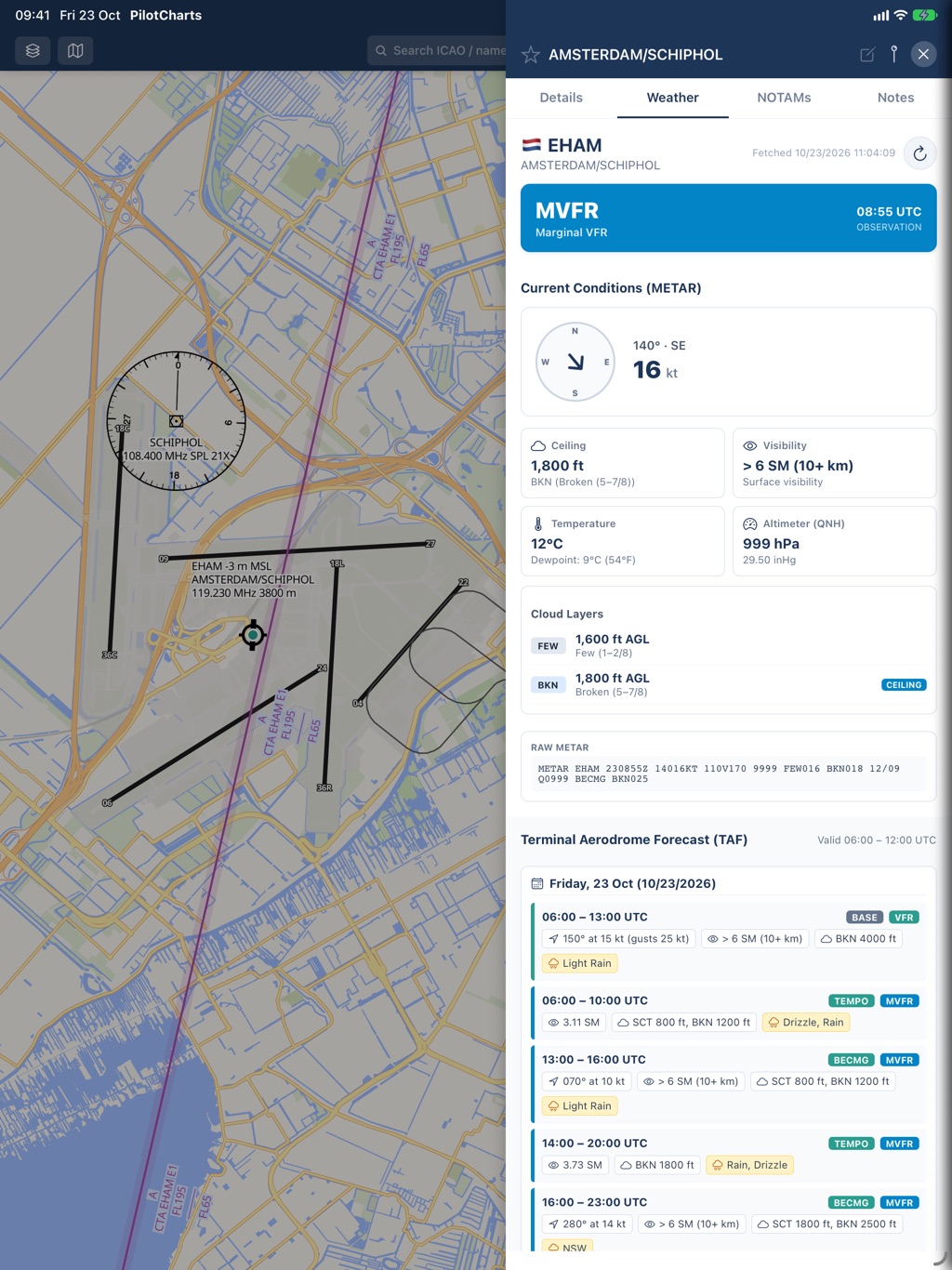
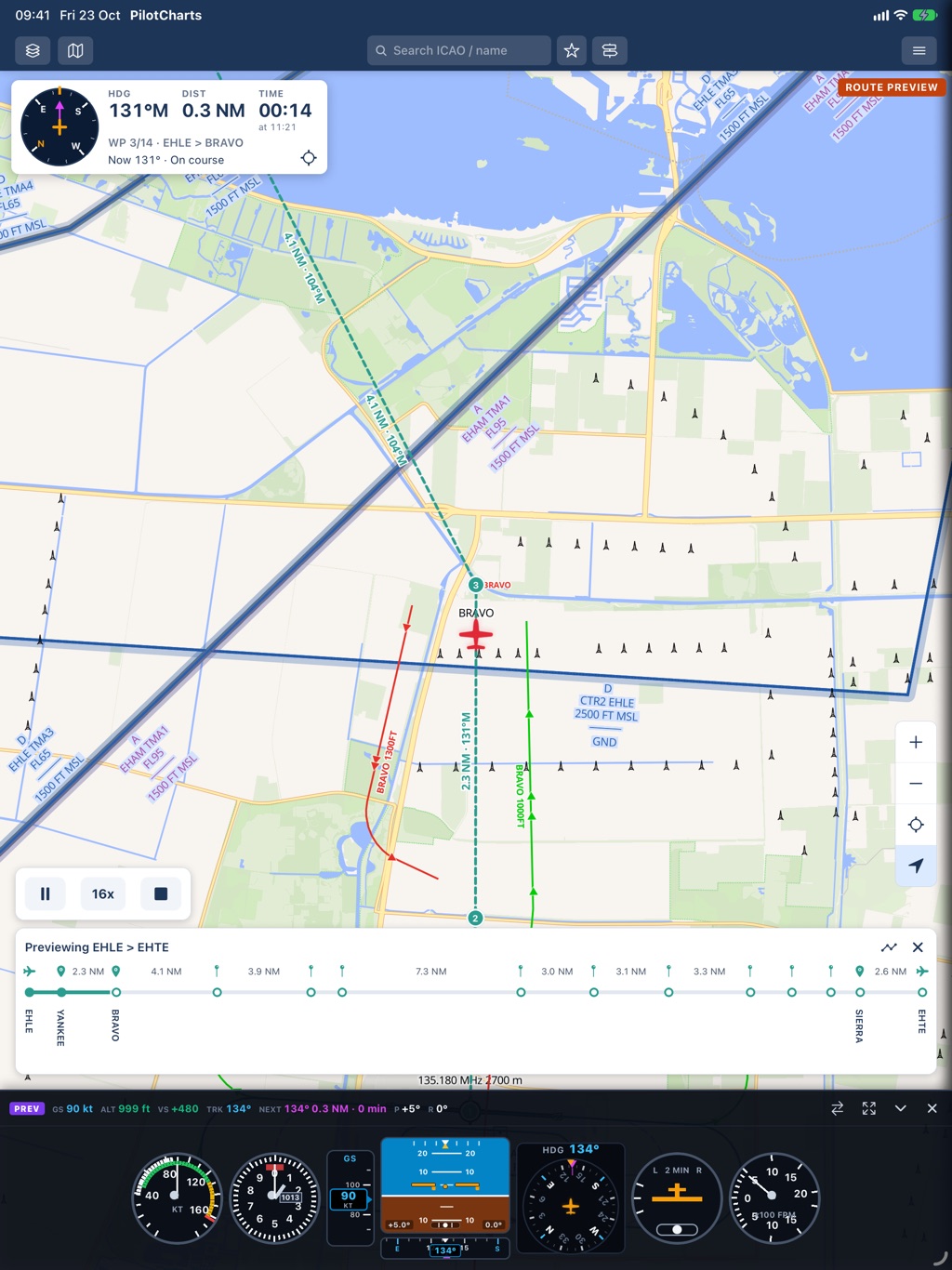
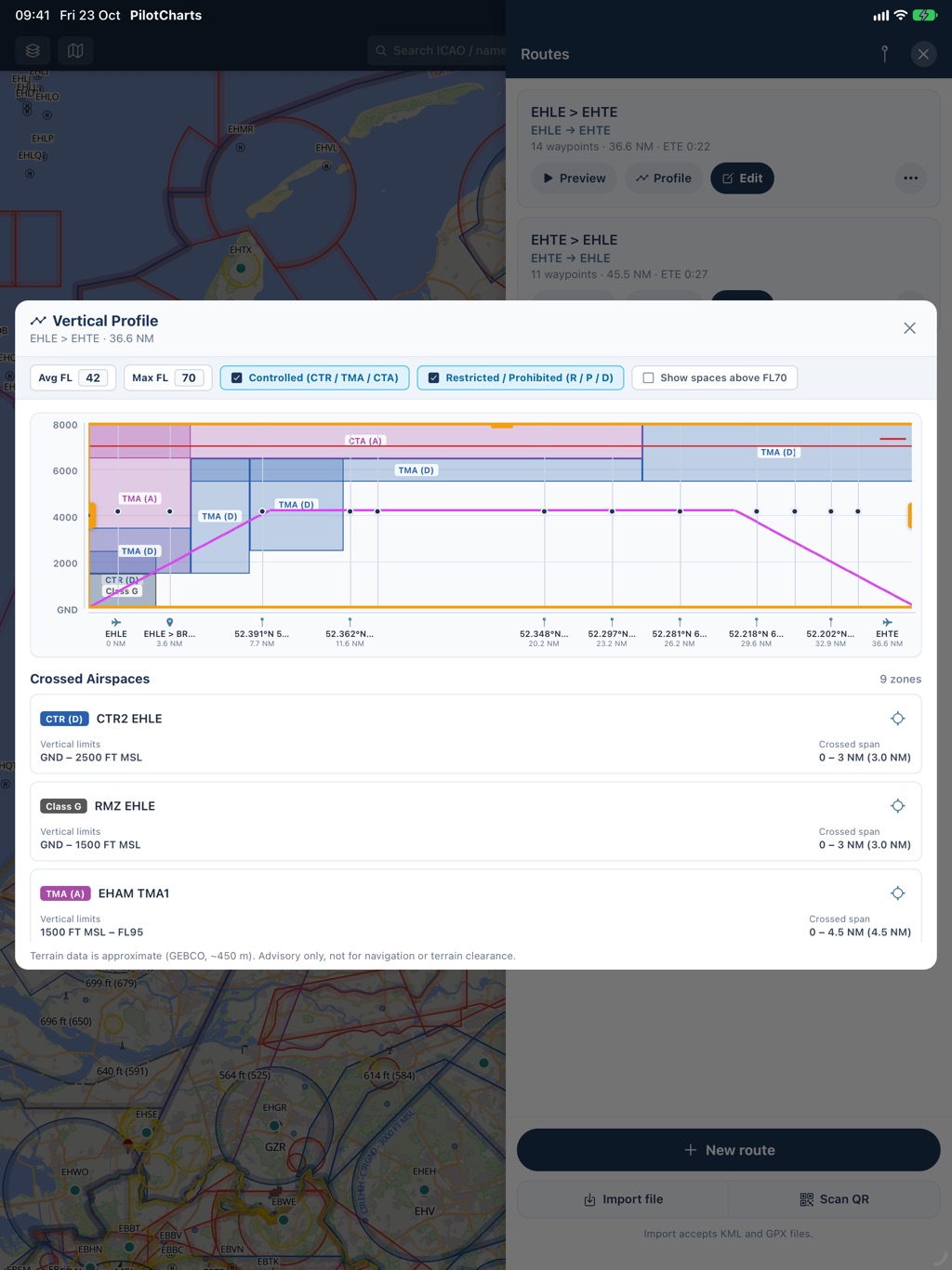
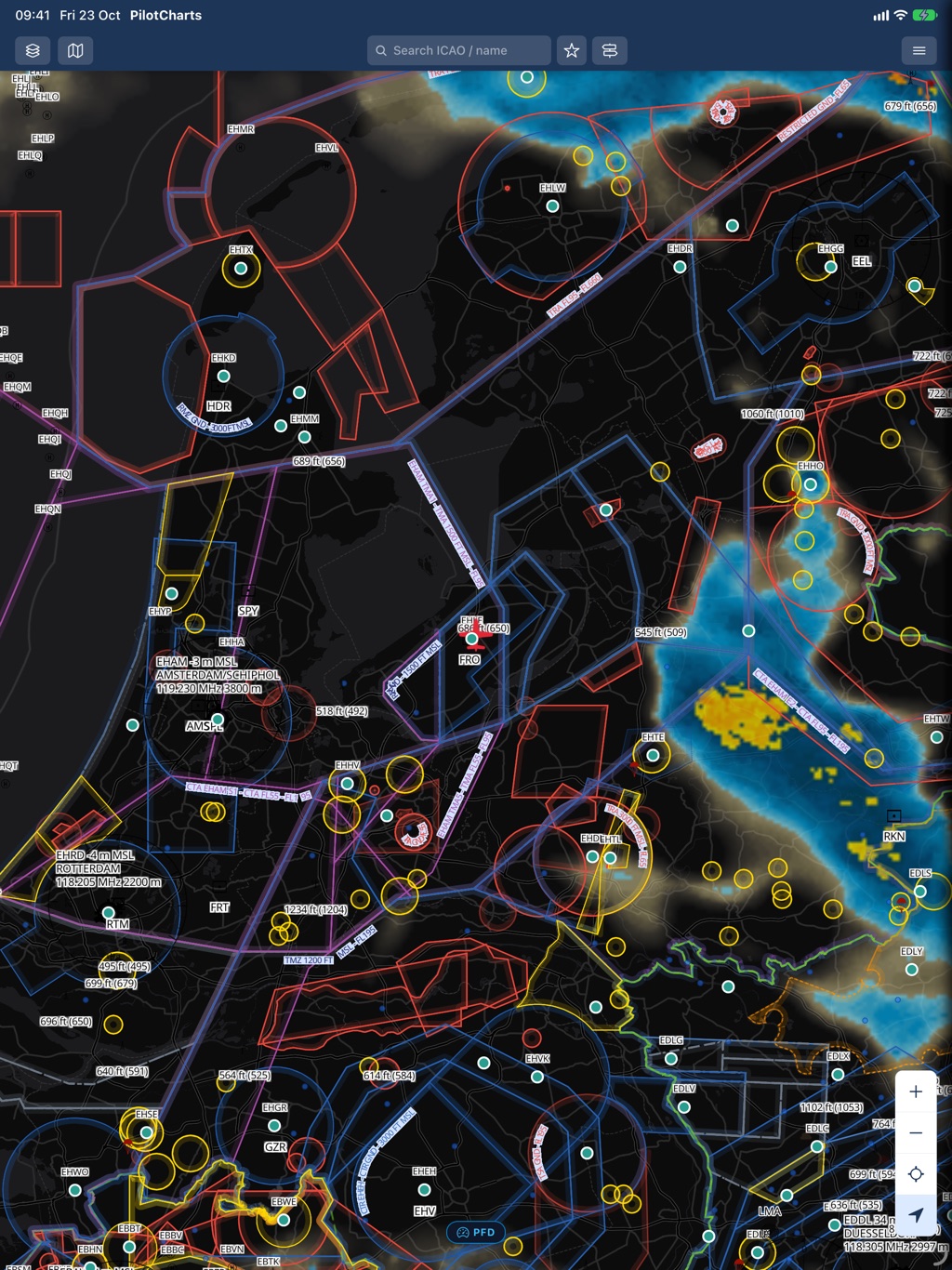
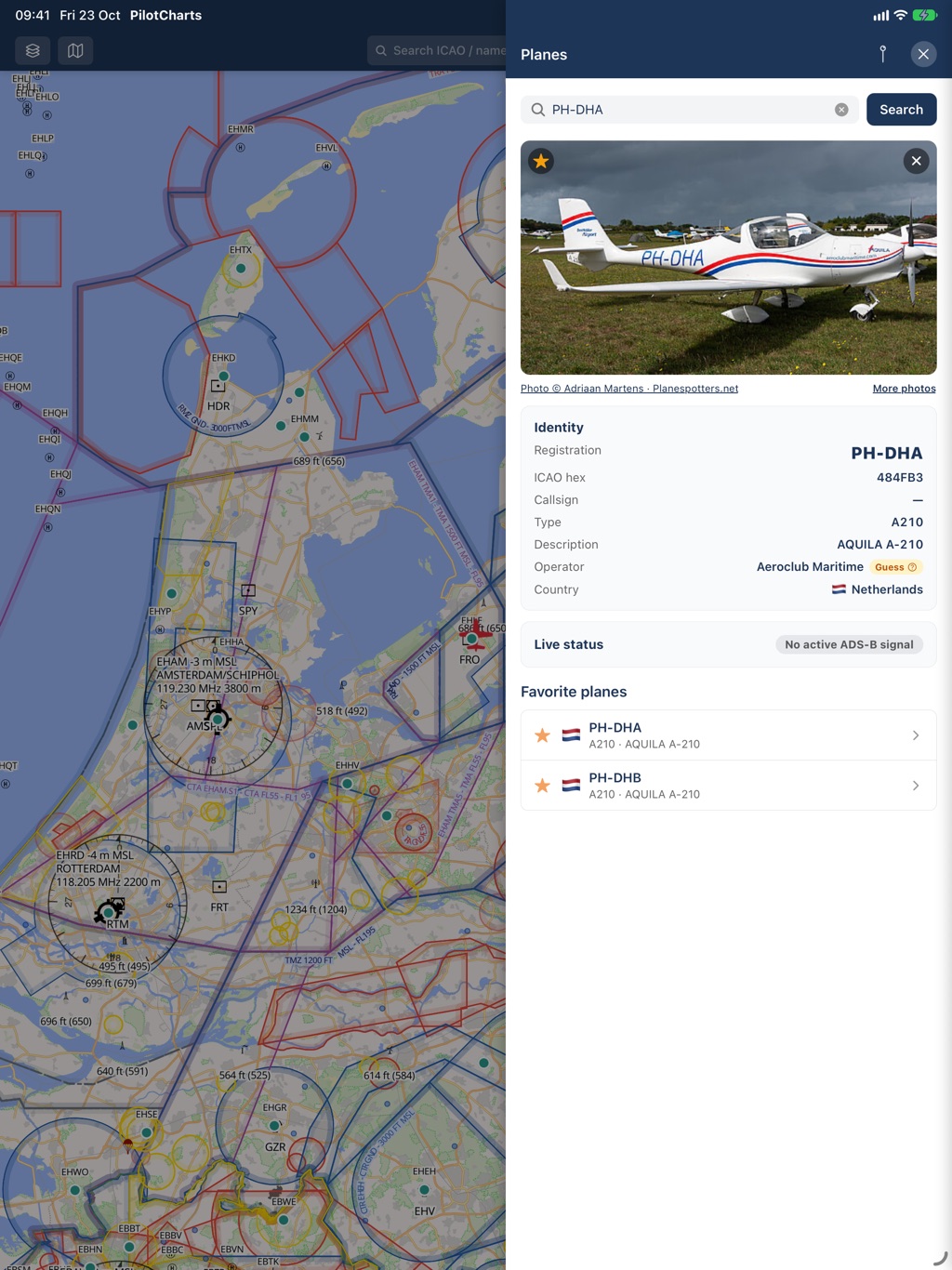
Engineered for the iPad — Landscape and Vertical
Whether mounted to your yoke, clamped to a kneeboard, or docked in the panel, PilotCharts adapts seamlessly to iPad in both orientations.
Side-by-Side Pinned Panels & Wide Instruments
In landscape orientation, PilotCharts delivers a desktop-class cockpit workstation. Pin aerodrome details, runway layouts, or route logs side-by-side with your chart without ever covering your moving GPS position. Flight instruments expand across the lower display with generous room for hybrid clusters.
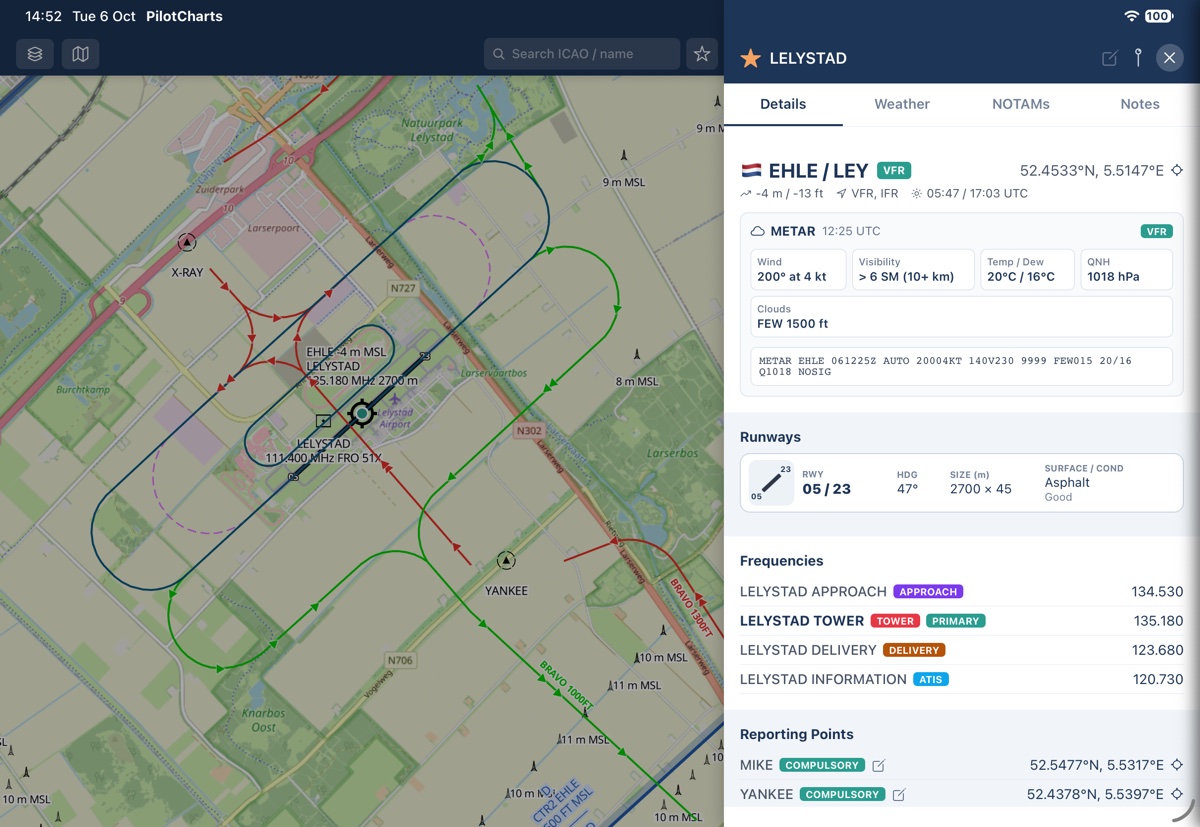
- Pinned side-by-side panels: Airport info, Route logs, and Planes stay open alongside the moving map
- Broad lateral chart awareness: enhanced peripheral vision through dense TMAs and CTR corridors
- Wide flight instruments: expandable Hybrid cluster or Glass PFD stretches comfortably across the bottom
- Ideal for yoke mounts, RAM arm brackets, and instrument panel docks
Maximum Forward Track, Six-Pack & Airspace NOTAMs
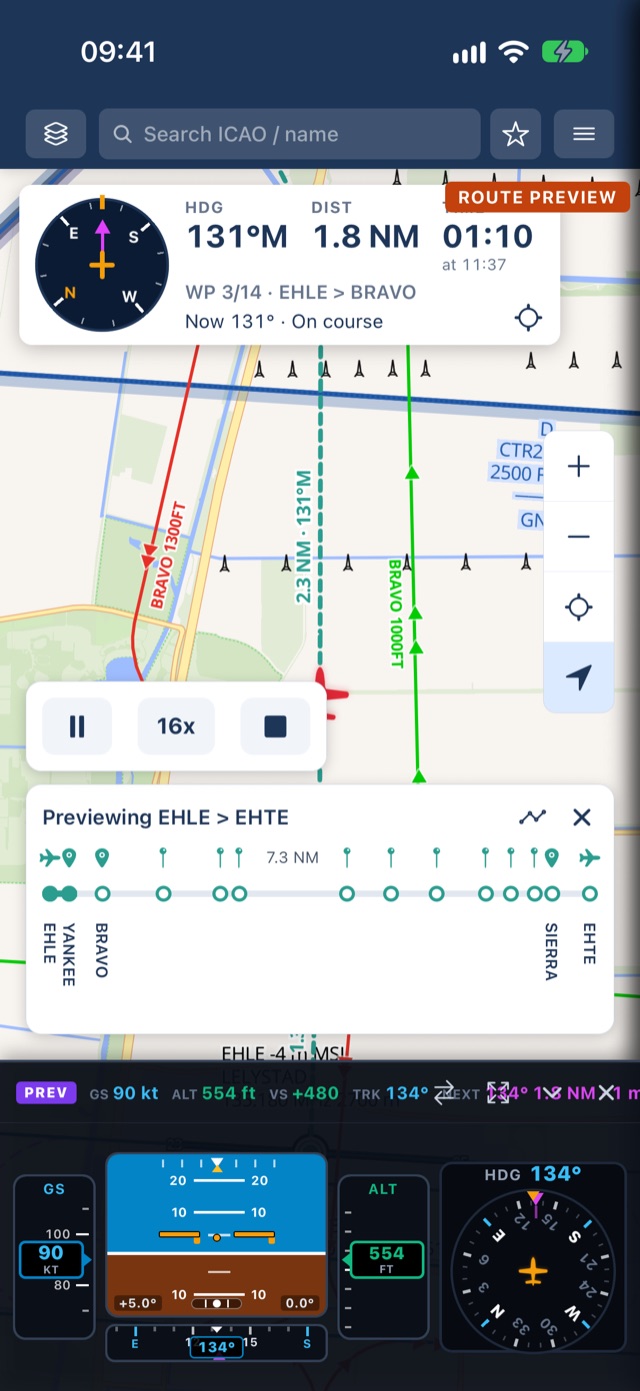
In portrait orientation, PilotCharts maximizes forward look-ahead distance along your flight path. Monitor miles of terrain, airspace corridors with dynamic active and deactivated NOTAM highlights, and approaching waypoints with round analog steam gauges or modern PFD instruments across the bottom.
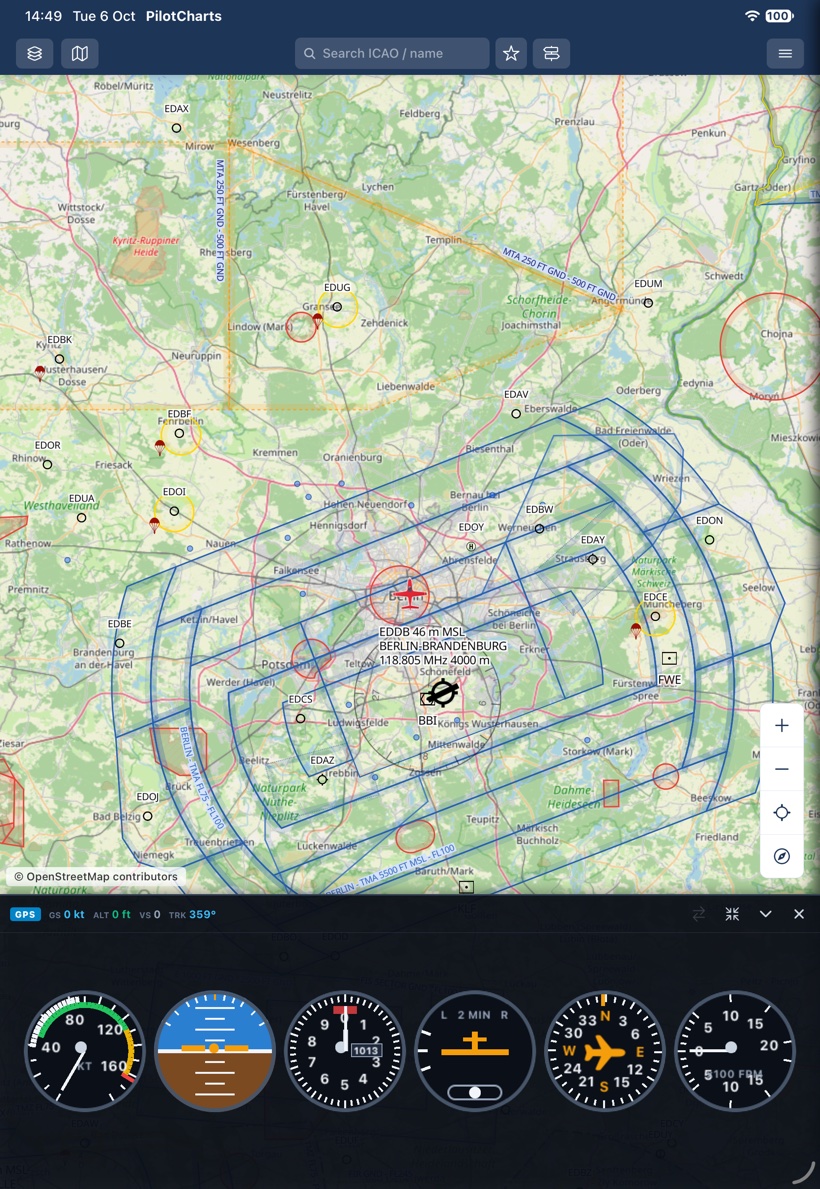
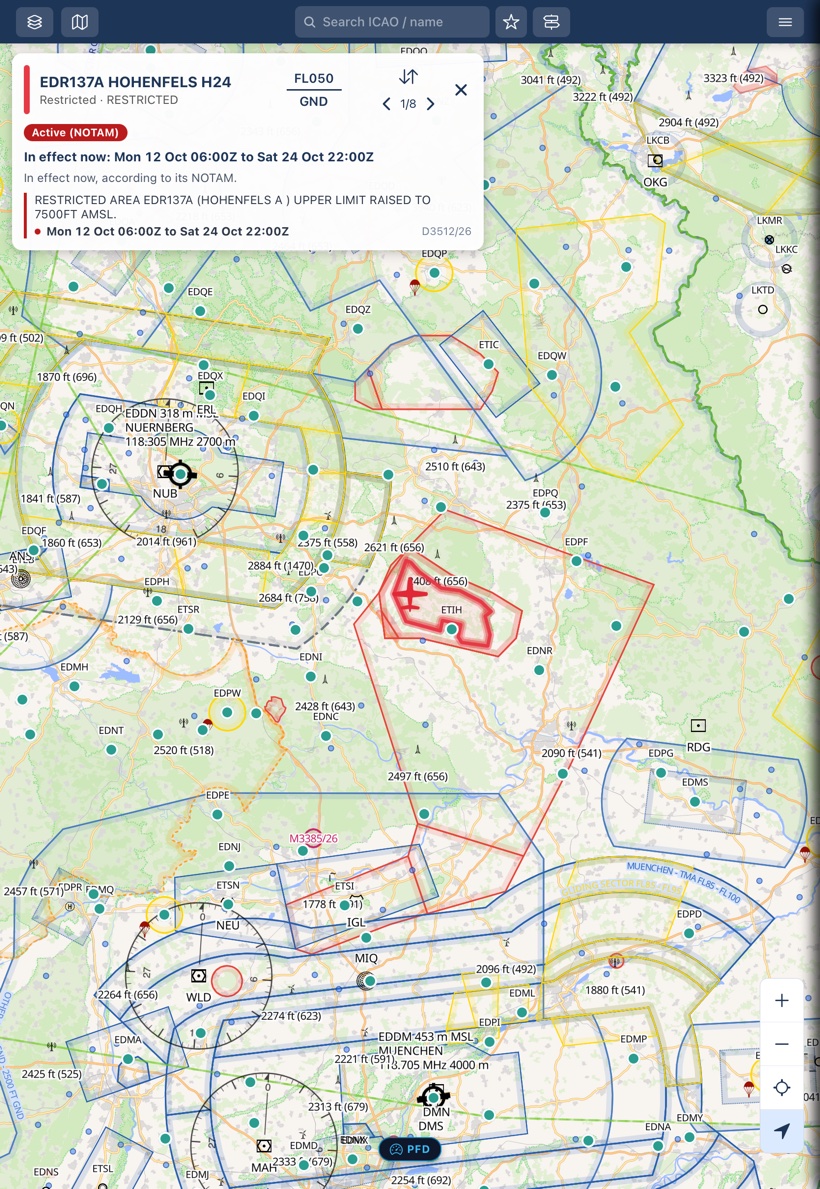
- Towering forward look-ahead: reveals approaching waypoints and airspace shelves far in advance
- Classic "Basic T" Six-Pack: full round analog steam gauges (ASI, attitude, altimeter, TC, DG, VSI)
- Dynamic airspace NOTAMs: highlights active restricted areas and TFR polygons along your flight corridor
- Clean kneeboard ergonomics: fits standard pilot thigh kneeboards with zero control stick interference
Built for real flying and cockpit workflows
Explore every major capability built into PilotCharts — from aerodrome intelligence and planes tracking to route elevation profiles and primary flight instruments.
50,000+ airfields, official AIP charts & live weather
Access instant operational intelligence for international hubs, regional airports, backcountry grass strips, glider fields, and ultralight sites worldwide. Inspect runways with surface condition and headings, operational radio frequencies with purpose chips, decoded METAR & multi-day TAF, PPR contact details, and jump straight to official national AIP chart PDFs in one tap.
- 50,000+ airports, grass strips, glider sites, and heliports with instant search
- Detailed runway specs: true & magnetic headings, dimensions, surface type, and lighting
- Tower, Approach, Delivery, Ground, ATIS, and Info frequencies with active chips
- Official AIP chart PDF links for 50+ countries (FAA d-TPP, NAV CANADA, skeyes, Avinor, LFV, and more)
- Decoded METAR & TAF with plain-English summaries and flight category badges (VFR, MVFR, IFR, LIFR)
- Local pilot notes with proximity distance alerts and custom document attachments (PDFs & photos)
Track your aircraft with real photos, live telemetry & ADS-B
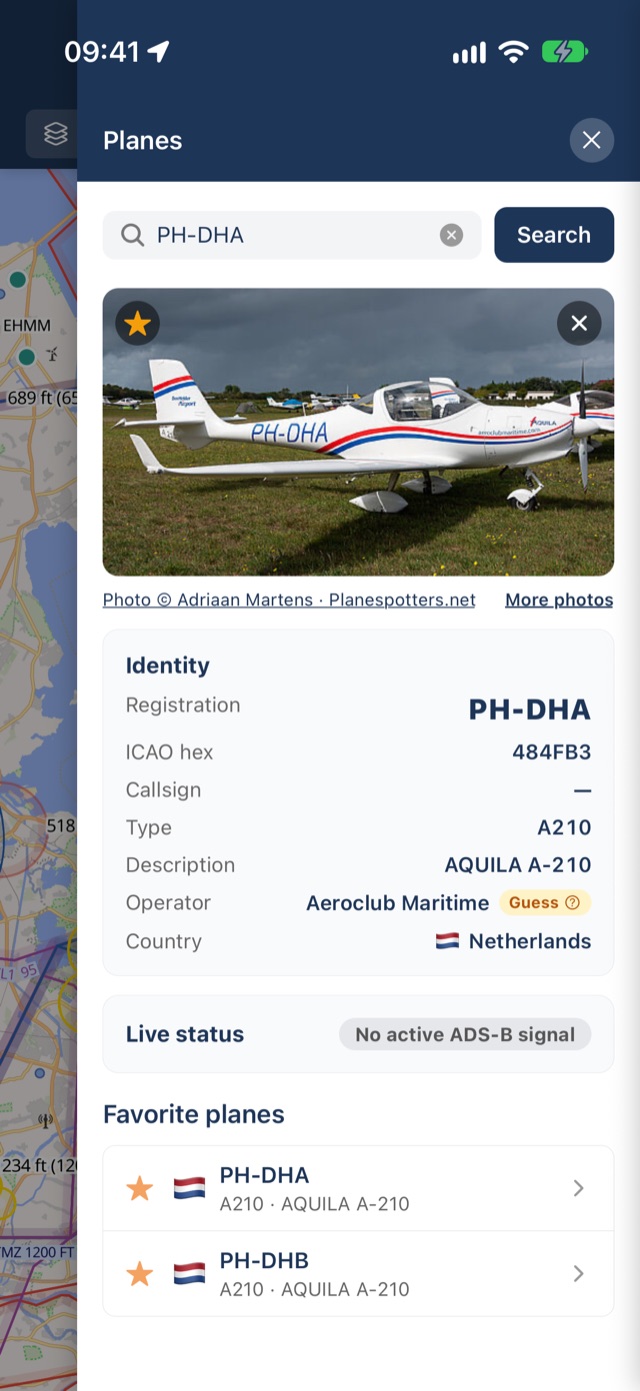
PilotCharts features a dedicated Planes panel for pilots and plane-spotters. Keep a curated list of favorite aircraft in your personal hangar, or tap any live ADS-B target on the chart to inspect tail number, type, smart operator identification, high-definition aircraft photos from Planespotters.net, and real-time telemetry.
- Personal fleet management: star and bookmark your favorite registrations and tracked aircraft
- Tap any ADS-B target on the map to open its complete aircraft card
- Real aircraft photography automatically fetched from Planespotters.net
- Identity verification: registration, ICAO 24-bit transponder hex, aircraft type, and operator guess
- Live telemetry status: pressure & GPS altitude, ground speed, track, vertical speed, squawk, bearing, and distance
- "Locate and follow" camera mode: smoothly follow any aircraft as it moves across the moving map
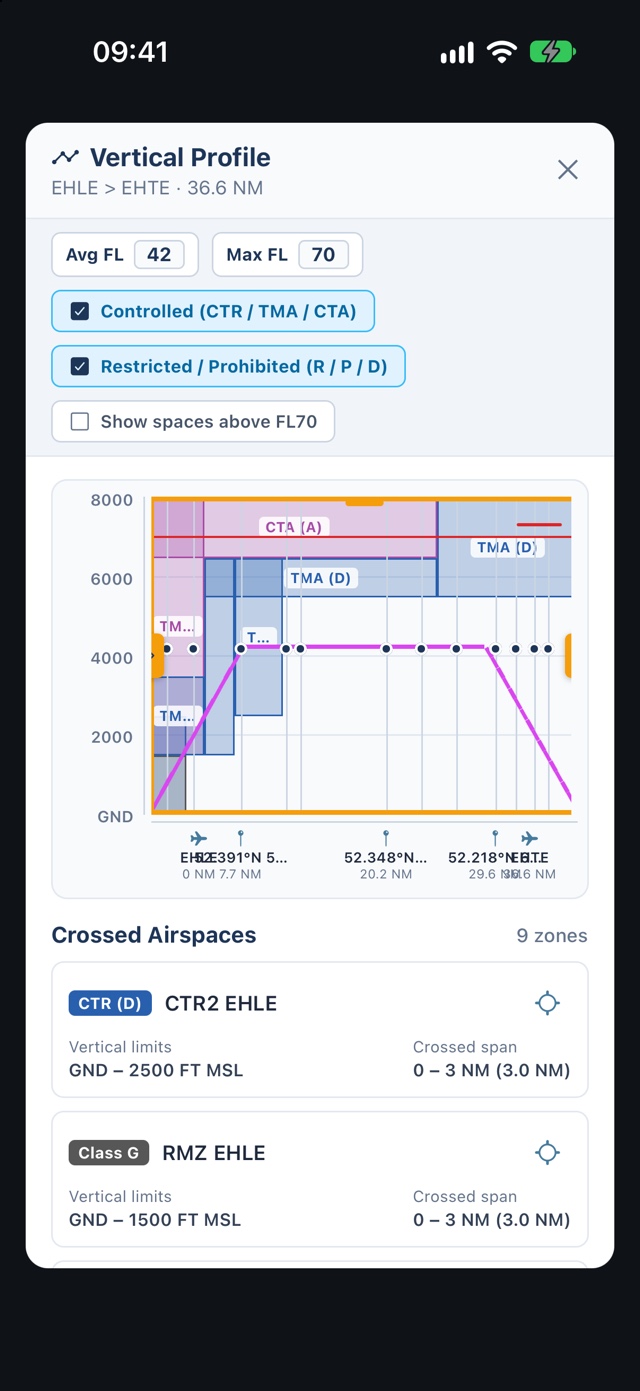
Multi-waypoint routes with 2D terrain elevation cross-sections
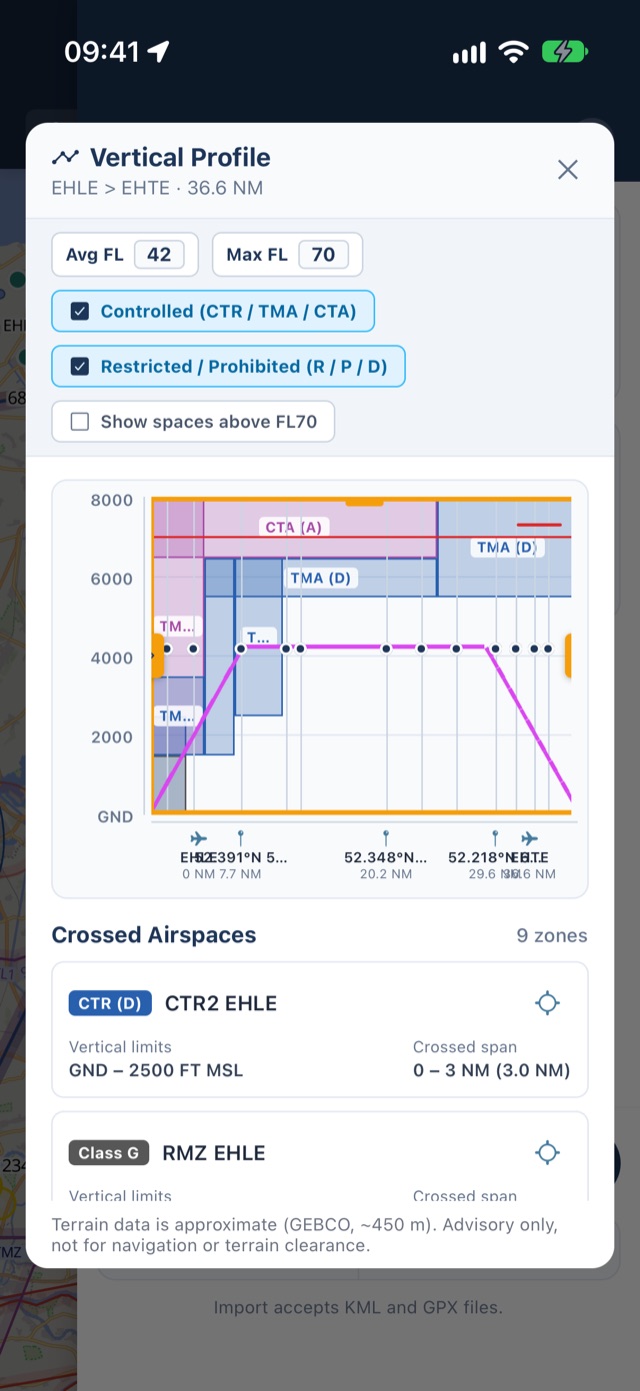
Plan VFR cross-country flights with full vertical situational awareness. Build multi-leg routes using airports, visual reporting points, VOR/NDB navaids, and custom user GPS coordinates. PilotCharts computes a high-resolution 2D terrain profile along your flight corridor using GEBCO 2024 data, plots ground elevation against your cruise altitude, and displays every crossed airspace shelf.
- High-resolution 2D terrain cross-section with ground profile and highest obstacle points
- Crossed airspaces mapped directly over your route with floor/ceiling limits and class colors
- Draggable range slider to inspect terrain elevation, clearance, and airspaces at any point
- Navigation calculations: magnetic & true headings, leg distances (NM), ground speeds, and ETE/ETA
- Route playback simulation mode to preview your planned flight ahead of time
- Professional Pilot Briefing PDF export: route overview map screenshot, waypoint navlog table, notes, and QR code to share routes
Glass PFD, classic analog steam gauges, or hybrid cluster
Transform your device into a primary flight display. Switch effortlessly between a modern Glass PFD (smooth airspeed and altitude tapes, artificial horizon with pitch/roll ladder, vertical speed indicator, and 360° rotating compass rose), classic "Basic T" Six-Pack round analog steam gauges with colored airspeed arcs, or a wide Hybrid cluster. Connect to X-Plane or MSFS via local UDP to practice in your home simulator.
- Modern Glass PFD: moving airspeed & altitude tapes, artificial horizon, VSI scale, and directional tape
- 360° rotating Compass Rose (HSI) with GA plane symbol, lubber line, and active route waypoint bug (magenta pointer + ETA/distance badge)
- Classic Six-Pack analog steam gauges: standard Basic-T arrangement (ASI, attitude, altimeter, turn coordinator, DG, VSI)
- Wide Hybrid layout combining digital tapes with round analog gauges
- Flight simulator UDP integration: stream telemetry from X-Plane and Microsoft Flight Simulator (ForeFlight protocol)
- Collapsible & resizable: toggle between full cluster, compact telemetry strip, or dismiss to a minimal floating badge
Customize every airspace color, aircraft symbol & map theme
Every pilot has distinct preferences in the cockpit. PilotCharts offers unprecedented map personalization: recolor every airspace class independently, tune border thickness multipliers, zone fill opacity, border stripes/hatching, and inner boundary shading. Choose your aircraft marker shape and color, pick high-performance base map vector or satellite themes, and position on-screen controls in any corner.
- Recolor every airspace class (CTR, TMA, Gliding, Special Use, Classes A through G)
- Airspace styling: adjust border thickness, zone fill opacity, border stripes, and inner boundary shading
- Aircraft marker customization: choose icon shape (Light GA, Cessna 172 high-wing, Jet, Airliner) and custom color
- Base map themes: OpenFreeMap vector styles (Liberty, Bright, Positron, Dark), Esri World Imagery satellite, and OSM
- Configurable floating controls: place zoom, GPS centering, stopwatch, and PFD reopen buttons in any screen corner
- North-Up vs Heading-Up chart rotation with customizable follow zoom and label stacking detail thresholds
Deconstruct complex airspace shelves with a single tap
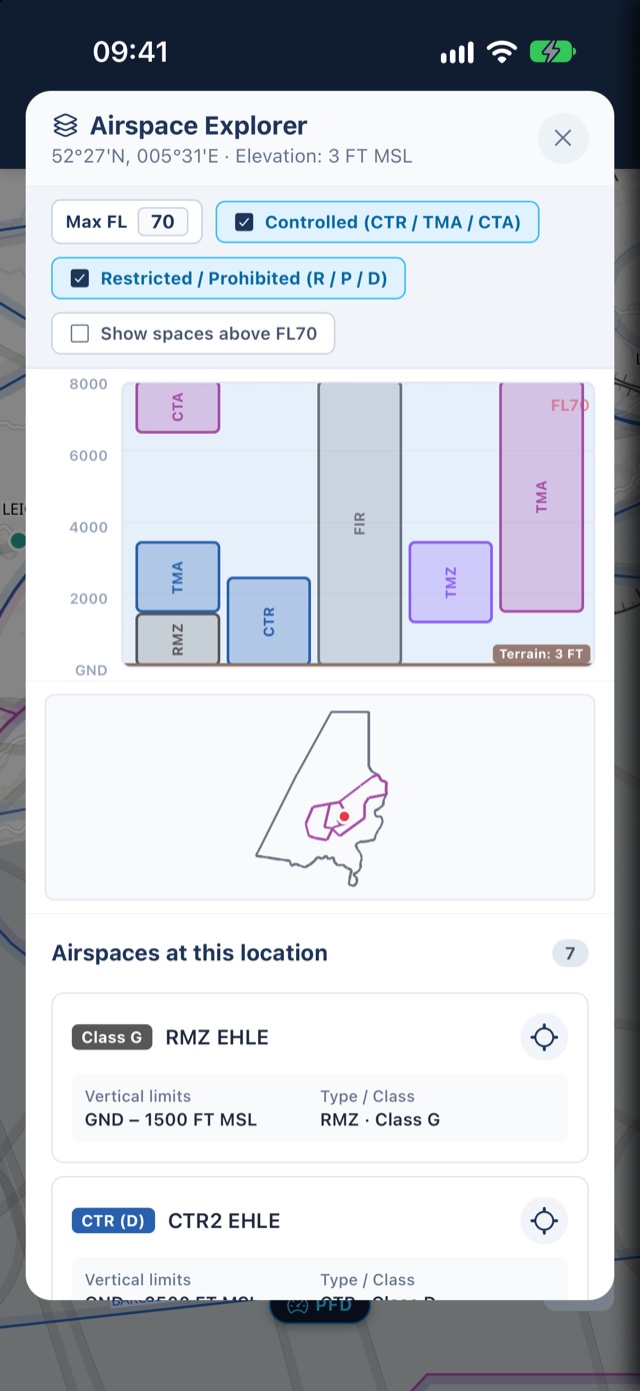
Controlled airspace often stacks in complex steps and shelves that are hard to interpret on a flat map. Long-press anywhere on the chart or tap an airspace boundary to open the Airspace Explorer. PilotCharts cuts a vertical slice from ground level up to FL660, displaying all intersecting airspace layers in clear side-by-side vertical columns with smart filtering and an interactive cruise ceiling reference.
- Smart route-style filters: Filter by controlled airspace, restricted / danger zones, or hide spaces above your cruise level
- Interactive Max FL ceiling line: Set your target altitude (e.g. FL70) to see a dashed cruise ceiling across all vertical slices
- Side-by-side vertical column lanes: Clear floor and ceiling limits with explicit MSL, AGL, and Flight Level (FL) readouts
- Frequencies & callsigns: Instant access to active tower, radar, and information frequencies right on each column
- Live footprint outlines: Tap any airspace column to highlight its precise perimeter on the moving map
Dynamic active & inactive airspace status, TFRs & schedules
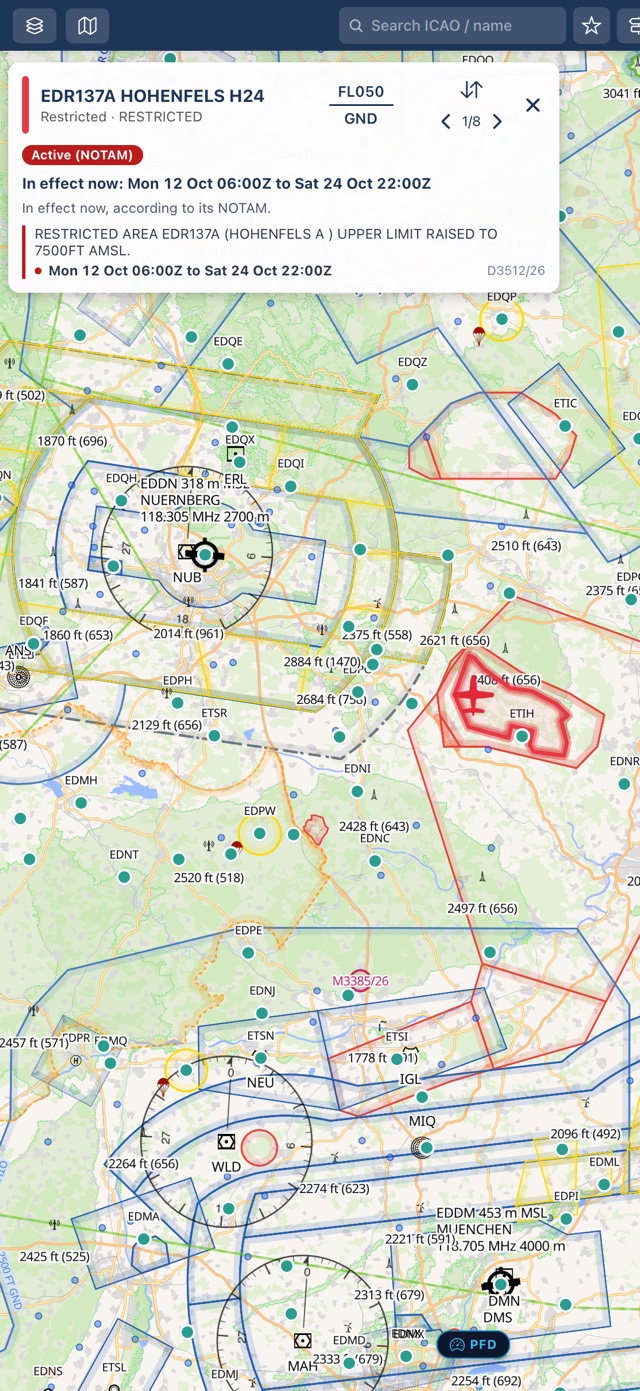
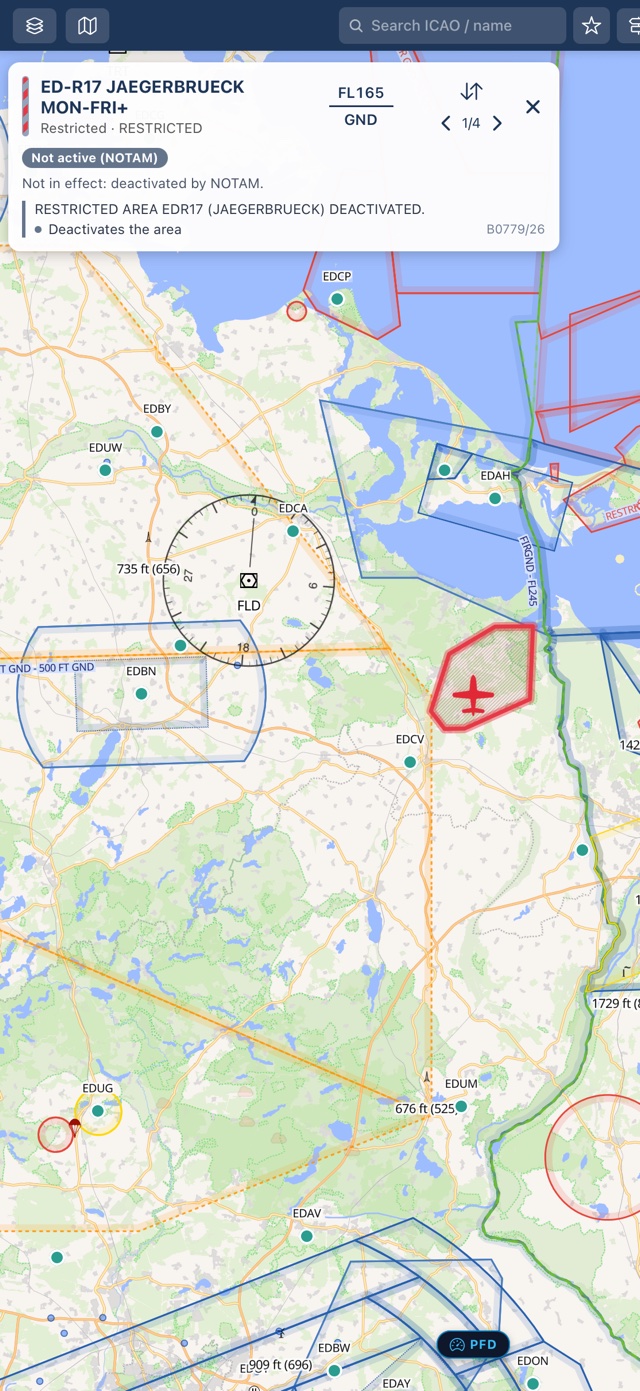
Never guess whether a military restricted area, danger zone, or CTR is actually hot. PilotCharts connects airspace geometries directly to official NOTAM feeds, calculating whether each zone is currently active, deactivated, or scheduled for activation. Active restricted areas glow with bold boundary highlights and raised ceiling alerts, while cold airspaces switch to transparent diagonal grey hatching and dashed borders. Temporary flight restrictions (TFRs) and drone activity corridors are drawn as dedicated NOTAM polygons directly over your moving chart with full UTC validity windows.
- Dynamic visual states: Instantly distinguish Active (solid border & glowing boundary), Inactive (diagonal grey hatching, dashed outline), and Unknown airspaces
- Temporary Flight Restrictions (TFRs): NOTAM-defined drop zones, air shows, and drone corridors rendered as dedicated polygon areas on the chart
- UTC schedule windows & recurring rules: Tap any airspace card to view active UTC timeframes, effective dates, ceiling changes, and full NOTAM text
- Hide inactive military airspace: One toggle in Settings hides cold danger and restricted areas completely, decluttering congested corridors
- Active status badges: Green “Active (NOTAM)”, amber “Not active (NOTAM)”, and schedule countdowns displayed directly on airspace cards
- 24-hour offline persistence: Active NOTAM polygons and status rules persist to disk so your chart awareness stays sharp without cellular signal
Decoded METAR, TAF, live radar, and airport pre-flight NOTAMs
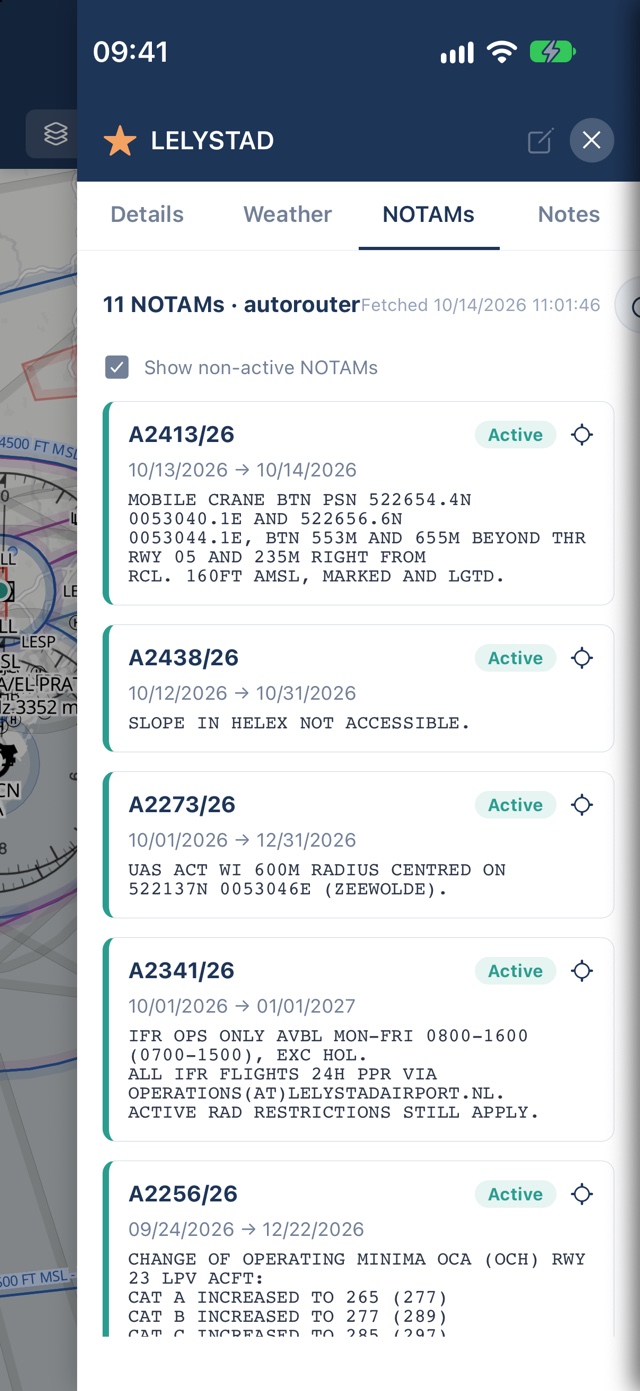
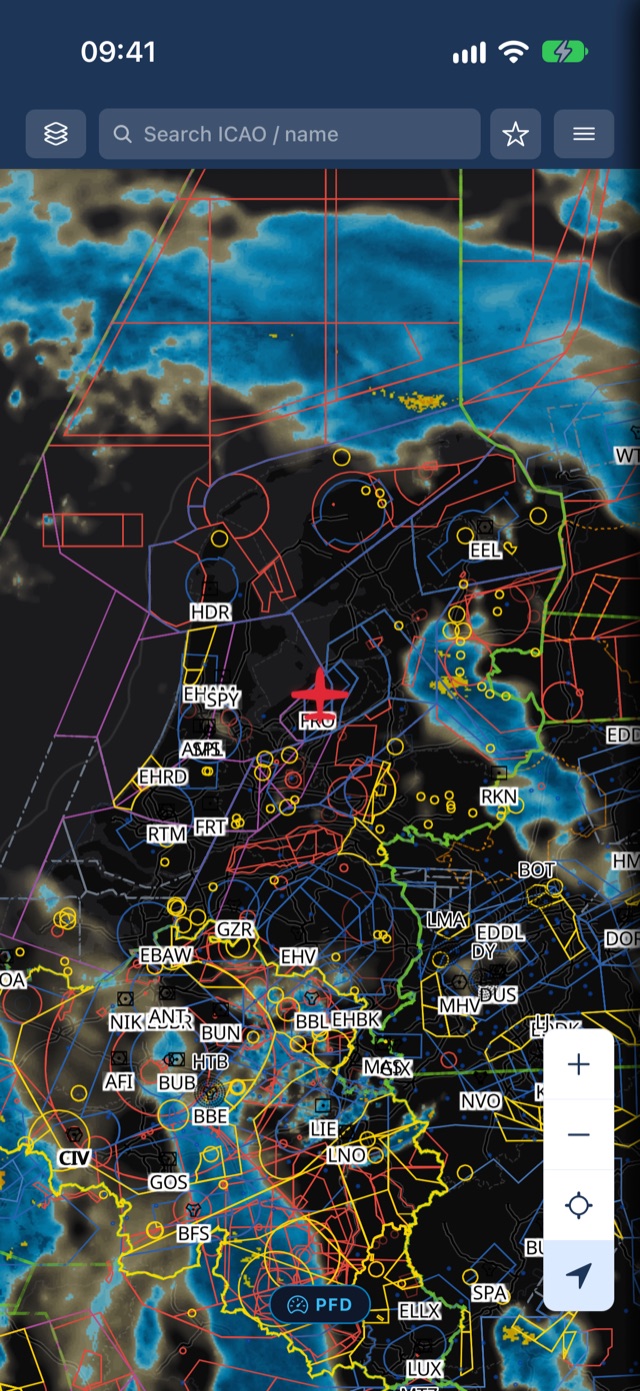
Get the complete pre-flight and en-route operational picture. Inspect live METAR and multi-day TAF with instant flight-category badges (VFR, MVFR, IFR, LIFR) and plain-English decoding. Check real-time rain radar, wind barbs, and cloud cover chart overlays. Review aerodrome NOTAMs fetched via FAA NMS and Autorouter with active validity windows, runway closure tags, and tap-to-spotlight coordinates on your chart.
- Decoded and raw METAR / TAF straight from NOAA Aviation Weather Center and DWD
- Airport NOTAMs tab from FAA NMS and Autorouter with active, upcoming, and expired status badges
- Tap any NOTAM coordinate to spotlight the affected location on the moving map
- Rain radar, wind barbs, cloud cover, and surface pressure chart overlays
- Comprehensive Route Briefing PDF export combining route navlog, waypoint notes, airport weather, and NOTAMs
Download by country or continent — fly anywhere offline
PilotCharts is built for the reality of general aviation: you can't rely on cellular signal at 5,000 feet. Base map vector and satellite tiles cache automatically as you browse. Download complete country data packs covering airports, reporting points, VFR routes, navaids, airspaces, obstacles, and high-resolution GEBCO 2024 terrain elevation packs pre-generated by the PilotCharts backend.
- Continent & worldwide downloads: One-tap batch downloads for entire continents (Europe, North America, etc.) with verified download sizes
- Complete offline data packs: Airports, grass strips, reporting points, VFR routes, navaids, airspaces, and obstacles
- GEBCO 2024 terrain elevation: Pre-generated offline elevation grids for accurate terrain profile rendering without an internet connection
- VAC/ADC chart link indicators: Country badges highlight where official visual approach and aerodrome charts are available
- Automatic ambient map caching: Every vector or satellite tile viewed is saved to disk for offline access
Free to fly. Pro to do more.
The moving map, over 50,000 airfields, search, and airport details stay free forever — no trial clock, no feature cliff.
- Live GPS moving map with VFR aeronautical chart overlay
- Automatic offline map caching
- 50,000+ airports, grass strips & glider fields worldwide
- Airport details from openAIP — runways, frequencies, PPR, hours
- Official AIP chart PDF links for 50+ countries
- Closest-airports lookup & favorite airports
- Per-country downloads for airports, navaids, airspace & obstacles
- North up / Heading up chart orientation
- Floating flight stopwatch timer
- Everything in Free
- Planes panel & fleet tracking with favorite aircraft list
- Live ADS-B traffic with category silhouettes & Planespotters photos
- Airspace Explorer vertical column stack & active frequencies
- Dynamic Airspace NOTAMs on the map with active/inactive visual status & TFRs
- Route Planning with 2D terrain elevation cross-sections & airspace crossings
- Worldwide NOTAMs from FAA & Autorouter with active status badges & chart spotlight
- Glass Cockpit PFD (speed & altitude tapes, artificial horizon, VSI, compass rose)
- Classic Six-Pack analog steam gauges & Hybrid cluster styles
- Route briefing PDF export with map overview, weather & NOTAMs
- Desktop flight simulator UDP streaming (X-Plane & MSFS)
- Decoded METAR & TAF aviation weather with flight categories
- Rain radar, wind, clouds & pressure weather overlays
- Full map color & styling personalization, custom pilot notes & PDF attachments
- Pre-generated GEBCO 2024 global elevation packs
Questions pilots ask
Is PilotCharts free?
What is the Planes and fleet tracking feature?
How does PilotCharts adapt to iPad in landscape and vertical?
What are the Airspace Explorer and Route Elevation Profile?
How do official national AIP chart links work?
How do NOTAMs work in PilotCharts?
On the moving chart: Controlled, restricted, and danger airspaces dynamically connect to official NOTAM feeds. The chart visually reflects whether an airspace is actively hot (solid outline and bold boundary highlight) or deactivated/cold (dimmed diagonal grey hatching and dashed border). Temporary flight restrictions (TFRs) and drone activity corridors are drawn as dedicated NOTAM polygons. Tap any airspace on the chart to inspect its active UTC schedule windows, effective dates, and full official text. Pilots can also enable the “Hide inactive airspace” setting to completely declutter cold military zones from the chart.
For airports: Each aerodrome panel includes a dedicated NOTAMs tab powered by FAA NMS and Autorouter gateways. Notices are decoded with clear validity date spans, categorized into active, upcoming, and expired badges, and feature one-tap coordinate geolocations that spotlight the exact affected taxiway, runway, or obstacle on the chart.
All NOTAM data is cached locally for 24 hours so you retain full operational awareness even when flying completely offline.
Can I connect PilotCharts to X-Plane or Microsoft Flight Simulator?
Can I use this for navigation?
Does it work without an internet connection?
Where does the data come from?
Which platforms does it support?
When does it launch?